
Comparison: Label Printers
Kroko 600 ElectricPro or Brady M410?
The comparison shows how material size, cutting and software workflow affect daily identification work.
The comparison is divided into two parts: the devices' stand-alone features, and their PC connectivity and software (Kroko Autoprint and Brady Workstation). Below you'll find the points where the devices truly differ—and what those differences mean for practical labeling work.
Updated 18.8.2026
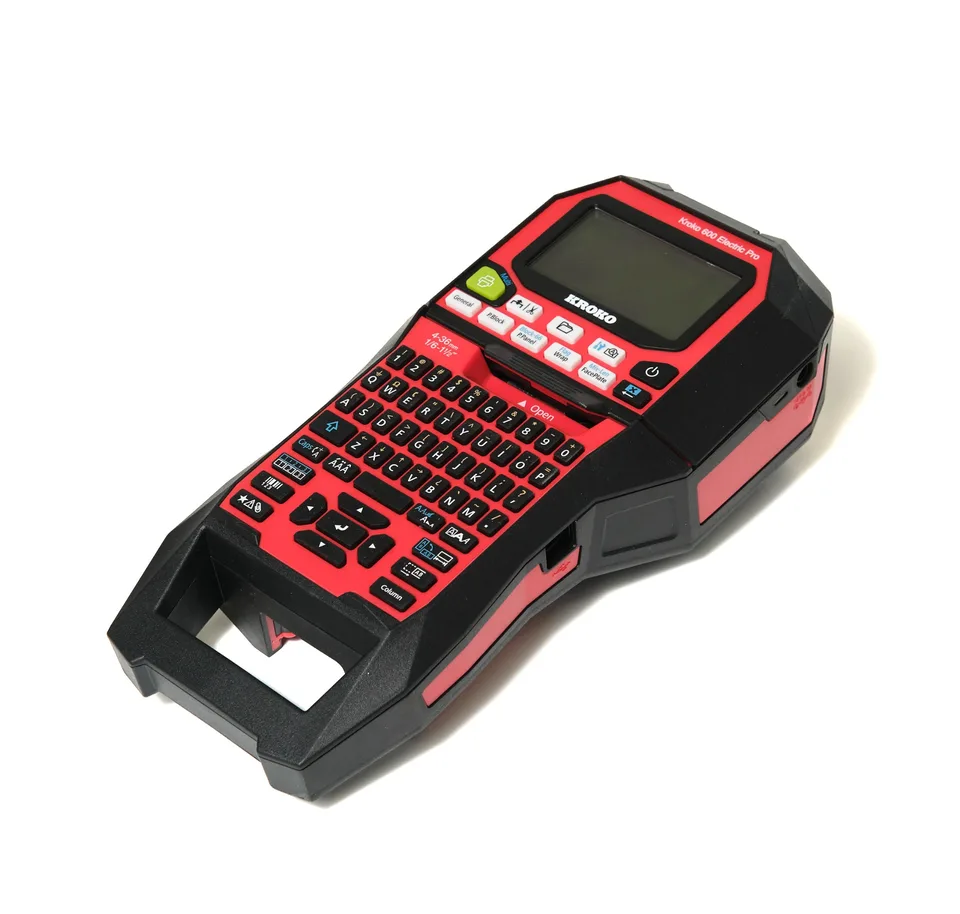
The short answer
Choose the Kroko 600 ElectricPro if:
- you want wider labels: materials from 4–36 mm
- you need a sharper print for small text: 360 dpi
- you print heat-shrink tubes for thicker cables too: 3–21 mm
- you want the Half-Cut and back-feeding feature
- your labels are generated from Excel, CSV, or DXF files with Kroko Autoprint
The Brady M410 may be sufficient if:
- your labels are a maximum of 25.4 mm wide
- a print resolution of 300 dpi is enough for your needs
- manual cutting fits your workflow
- you use Brady's Authentic M4/M4C material system
- your PC workflow is handled with Brady Workstation applications
The Basics: Standard Features on Both Printers
Both devices have a built-in keyboard and screen, so you can create labels without a computer. These features don't decide the comparison—they are the basics for a professional-grade handheld printer.
On-device text entry
Built-in keyboard and screen: create and print labels in the field without a computer.
Serialization
Sequential numbering and series for when you need dozens of labels at once.
Cable and wire labels
Wrap-around and flag labels for cables and thin wires.
Heat-shrink tubes
Heat-shrink tube labels are part of both printers' material selection.
Continuous material
Print labels of any desired length from continuous tape.
Pre-cut labels (die-cut)
Pre-cut labels: Kroko has DieCut recognition, Brady has M4 materials.
Cartridge system
In both, the material and ink ribbon are in the same cartridge, making swaps quick.
PC connectivity via USB
Both devices can be connected to a computer for batch printing and data import.
The Real Comparison: Where the Differences Lie
Below are only the points where the documented specifications of the devices differ.
| Feature | Kroko 600 ElectricPro | Brady M410 | Advantage |
|---|---|---|---|
| Print resolution | 360 dpi | 300 dpi | Kroko |
| Max. material width | 36 mm (materials 4–36 mm) | 25.4 mm | Kroko |
| Heat-shrink tubes | 3–21 mm | Available in the M4 material selection | Kroko |
| Cutting | Half-Cut and back-feeding | Manual cutting | Kroko |
| Power sources | AC adapter, battery pack, and batteries | Rechargeable NiMH battery pack and AC adapter | Kroko |
| Stand-alone use | Yes, keyboard and screen | Yes, keyboard and screen | Tie |
| PC connectivity | USB | USB | Tie |
| Excel and CSV import | Kroko Autoprint | Brady Workstation / Advanced Import | Tie |
| DXF file utilization | Yes | No confirmed equivalent function | Kroko |
| Material system | Kroko materials 4–36 mm and die-cut | Brady Authentic M4/M4C | Tie |
What the Differences Mean in Practice
Wider label, more information
Kroko's 36 mm is over 10 mm wider than Brady's stated 25.4 mm. This means longer IDs, more lines of text, and more legible panel and equipment labels.
Sharper print on small text
360 dpi versus 300 dpi is noticeable on small text, barcodes, and DataMatrix codes. The difference isn't dramatic, but it gives you a bit more leeway for tight labels.
Half-Cut and back-feeding
Kroko's Half-Cut only cuts the label, not the backing, and back-feeding saves material during batch printing. On the Brady M410, cutting is manual.
Heat-shrink tubes from 3–21 mm
Kroko's range of heat-shrink tubes also covers thicker cables, so the same device can handle both thin hook-up wires and heavy-duty supply cables.
Power source in the field
The Kroko runs on an AC adapter, a battery pack, or standard batteries—batteries are a practical backup option on a job site. The Brady M410 uses a rechargeable NiMH battery pack or an AC adapter.
Data straight to labels
Both software packages feature Excel and CSV import and batch printing. Kroko Autoprint also reads DXF files, allowing labels to be generated directly from design documents.
Device + Software
Kroko 600 ElectricPro works seamlessly with Kroko Autoprint
Both devices connect to a computer via USB and have their own software environments: Kroko Autoprint and Brady Workstation. Kroko's model is based on ready-made data tables and layouts that can be modified and saved as reusable solutions.
Data straight to labels
Excel, CSV, and DXF in, finished labels out. No manual re-entry or typos.
Ready-made use cases
There are ready-made data tables and layouts for cable, wire, terminal block, patch panel, pipe, and equipment labels.
Save your own templates
You can create and save your own data table and layout once—no need to remake the same customizations for every job.
Scales as needed
Kroko Watcher, API calls, and Cloud Print integrate labeling with ERP, WMS, and production control systems as your needs grow.
Frequently Asked Questions
Information regarding the Brady M410 is based on the manufacturer's current product and Brady Workstation sources. Information about Kroko products is based on product data from Kroko Print Solutions. Features that could not be reliably verified from the manufacturer's current sources have been omitted. Brady, M410, and Brady Workstation are trademarks of Brady Worldwide, Inc. Kroko Print Solutions Oy is not affiliated with Brady. The information was verified on August 18, 2026, and is subject to change.
Want to see the difference in action?
Book a 20-minute demo, and we'll show you the Kroko 600 ElectricPro and Kroko Autoprint with your own data. We'll also tell you straight if another device is a better fit for your needs.