
Comparison: Label printers
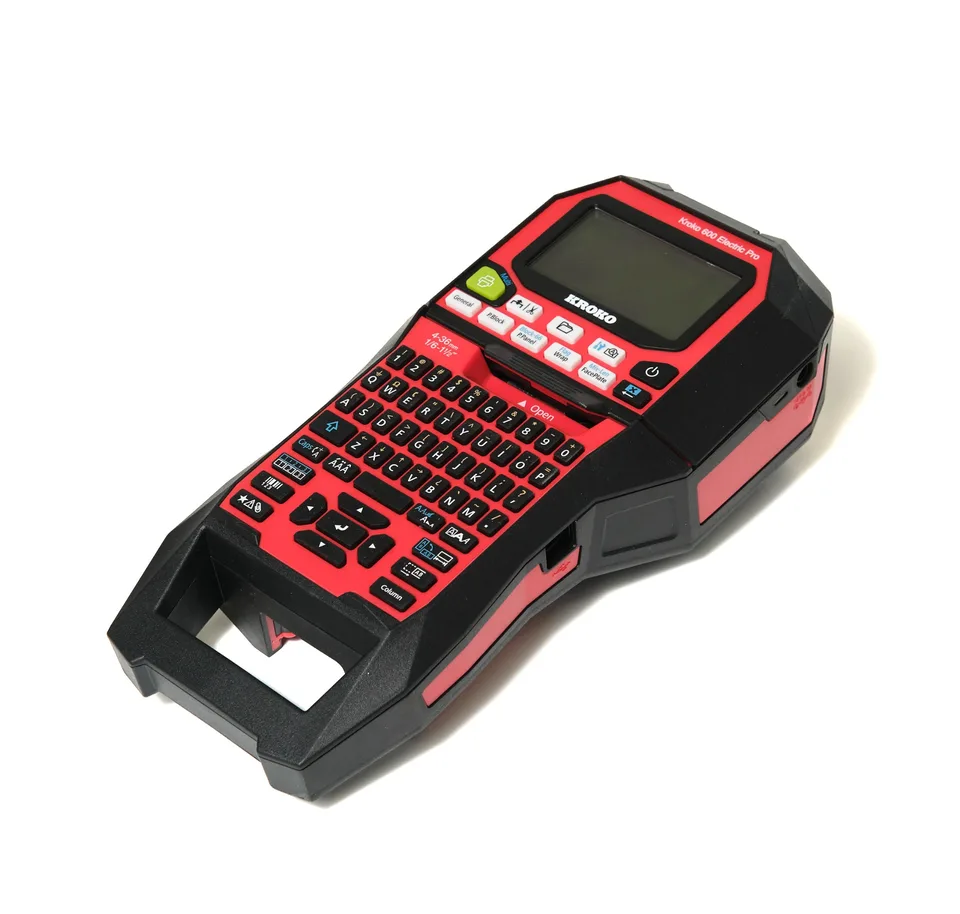
Kroko 600 ElectricPro or DYMO Rhino 6000+?
We examine how the devices differ in batch work, material handling and computer-assisted printing.
This comparison focuses on documented features: print resolution, speed, material widths, cutters, and PC workflow. Below, you'll find the points where the devices truly differ — and what these differences mean for practical labelling work.
Updated 18/08/2026
The short answer
Choose the Kroko 600 ElectricPro if you
- want wider labels: materials from 4–36 mm
- need sharper results for small text: 360 dpi
- print a lot and need speed: 35 mm/s
- want automatic Full-Cut and Half-Cut functions, plus Rewind
- create labels from Excel, CSV, or DXF data with Kroko Autoprint
The DYMO Rhino 6000+ might be sufficient if
- your labels are a maximum of 24 mm wide
- a print resolution of 180 dpi is enough for your needs
- a print speed of 10 mm/s is sufficient for your print volumes
- your PC use is limited to the basic functions of the DYMO ID software
The basics: Standard features on both devices
Both devices have feature sets designed for electrical and data communications labelling. These don't decide the comparison — they are basic requirements for a professional handheld printer.
Cable Wrap
A label that wraps around a cable, where the text remains readable even after installation.
Cable Flag
A flag-style cable label for thin wires and patch cords.
Patch Panel
An evenly spaced series of port and panel labels in a single print job.
Punch Block
Labels for punch-down blocks and terminal blocks with the correct spacing.
Faceplate
Labels for faceplates and outlets in neat series.
Fixed-length labels
Pre-determined length labels for when the label size is standardised.
Serialisation
Sequential numbering and advanced serialisation for more complex series.
Heat-shrink tubes
Heat-shrink tube labels; for Kroko, sizes range from 3–21 mm.
The actual comparison: Where the differences lie
Below are only the points where the devices' documented specifications differ.
| Feature | Kroko 600 ElectricPro | DYMO Rhino 6000+ | Advantage |
|---|---|---|---|
| Print resolution | 360 dpi | 180 dpi | Kroko |
| Print speed | 35 mm/s | 10 mm/s | Kroko |
| Max. material width | 36 mm (materials 4–36 mm) | 24 mm | Kroko |
| Cutter | Automatic Full-Cut and Half-Cut, plus Rewind | Manual cutter in manufacturer's comparison table | Kroko |
| PC connectivity | USB | USB | Tie |
| PC software | Kroko Autoprint: XLSX, CSV, and DXF data directly into labels | DYMO ID | Kroko |
| Heat-shrink tubes | Yes, 3–21 mm | Yes | Kroko |
| Electrical labelling functions | Electrical labelling functions and Autoprint workflows | Hot Key functions | Tie |
Click test: How many actions a task requires
Many printing applications are complex to use, and one measure of ease of use is how many clicks are needed to achieve a specific result. The figures are taken from Kroko Print Solutions Oy's internal test data as presented in the table.
| Task | Kroko Autoprint | DYMO ID |
|---|---|---|
| 3-line label, centred | 2 | 3 |
| Importing data from a new CSV file and printing (label template already exists) | 7 | 8 |
| Printing two different labels from the same data (multi-page templates) | 7 | not supported |
| Two different user-selected labels from the same data | 10 | 16 |
| Multi-page templates where pages have different sizes | 7 | not supported |
| Imported data can be edited | yes | yes |
| Record merging | yes | yes |
| Timestamps | yes | no |
| Merging a timestamp with other records | yes | no |
| Data filtering | yes | no |
| DataMatrix | yes | no |
| Separate print view without editor | yes | no |
The test covers a limited number of tasks, and its metric is the number of user actions. The results should not be interpreted as a general usability assessment.
What the differences mean in practice
Wider label, more information
Kroko's 36 mm is 12 mm wider than DYMO's stated 24 mm. This means longer identifiers, more lines of text, and more readable distribution board and device labels.
Double the nominal resolution
360 dpi versus 180 dpi is noticeable in small text, barcodes, and DataMatrix codes. Resolution alone doesn't determine the final quality, but it provides significantly more leeway.
Faster printing in batches
35 mm/s versus 10 mm/s is immediately noticeable when printing tens or hundreds of labels at a time.
Automatic cutters and Rewind
Full-Cut, Half-Cut, and Rewind speed up batch printing and save material — in DYMO's current comparison table, the cutter is listed as manual.
Data straight into labels
Kroko Autoprint reads XLSX, CSV and DXF data straight into labels and can filter and combine records. With DYMO ID the same job is done by hand — the difference shows immediately when the labels come from a switchboard diagram or a device list.
Multi-page templates: one dataset, several label types
With Kroko you get labels of different sizes and types from the same data in one go, for example a cable marker and a patch panel label. In the click test this takes 7 clicks — DYMO ID has no such feature.
Device + Software
The Kroko 600 ElectricPro works seamlessly with Kroko Autoprint
Both devices connect to a computer via USB, but the PC workflow determines the efficiency of most of the work. Kroko Autoprint reads XLSX, CSV, and DXF data and directs it straight to correctly sized labels — on the same device you use to label individual cables in the field.
Data straight to labels
Excel, CSV, and DXF in, finished labels out. No manual re-entry and no typos.
Automatic sizing
For example, the dimensions of a wrap-around label are determined by the cable type without manual calculation.
Safe printing for everyone
The designer creates the templates; the installer just prints. No one can accidentally break the layout.
Scales when needed
Kroko Watcher, API calls, and Cloud Print integrate labelling with ERP, WMS, and production control systems as your needs grow.
Frequently Asked Questions
DYMO information is based on the manufacturer's current product data, user manual, and comparison table (Rhino 6000+). Kroko information is based on Kroko Print Solutions' product data and the company's internal test data (click test). DYMO and Rhino are trademarks of companies belonging to the Newell Brands group. Kroko Print Solutions Oy is not affiliated with DYMO. Information checked on 18/08/2026 and is subject to change.
Want to see the difference in practice?
Book a 20-minute demo, and we'll show you the Kroko 600 ElectricPro and Kroko Autoprint using your own data. We'll also tell you straight if another device is a better fit for your needs.